To track AI traffic, check GA4’s AI Assistant channel, add a custom channel group to catch what it misses, and use Search Console’s Generative AI report for AI Overviews and AI Mode. No single report shows everything. GA4 counts clicks from ChatGPT, Gemini and other chatbots. Search Console counts how often Google’s AI features show your pages. Here’s how to track AI referral traffic in GA4, read Search Console’s AI data and report it to clients without overselling it.
KEY TAKEAWAYS
- GA4 added a native AI Assistant channel on May 13, 2026. It needs no setup and tags visits from ChatGPT, Gemini, Copilot, Grok and DeepSeek (Google Analytics Help).
- The native channel misses Perplexity, AI Overviews, AI Mode and AI app visits with no referrer. A custom channel group catches more, including older data.
- Clicks from Google’s AI Overviews and AI Mode count as Organic Search in GA4. You can’t split them out.
- Search Console’s Generative AI performance report shows AI Overviews and AI Mode impressions by page, but no clicks and no queries.
- Every AI traffic number is a minimum. Track branded searches and ask leads how they found you to see the rest.
Can GA4 track AI traffic?
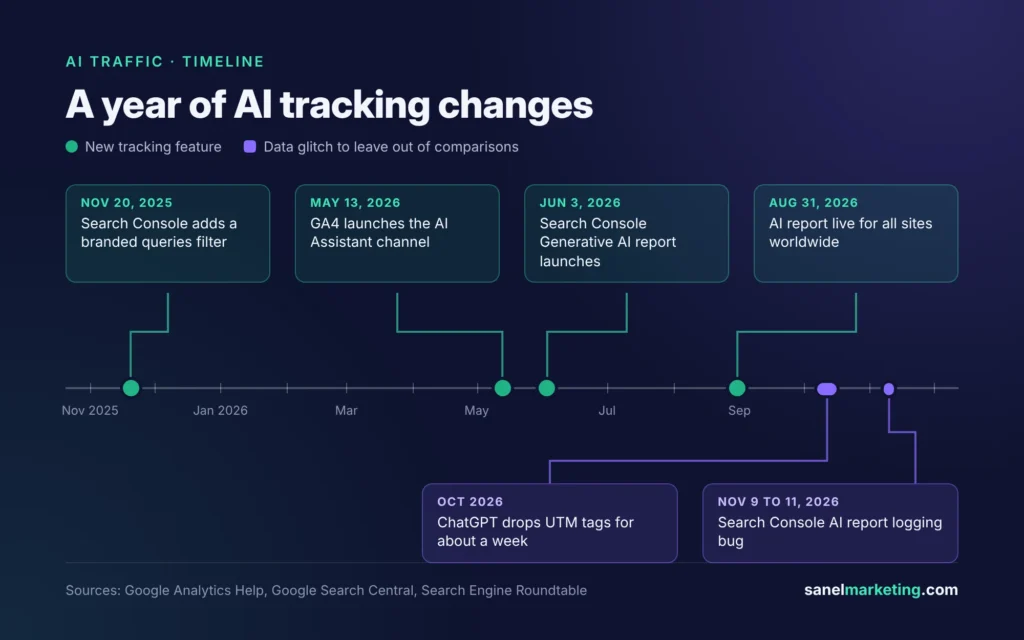
Yes. Since May 13, 2026, GA4 automatically groups visits from recognized AI assistants into a new AI Assistant channel.
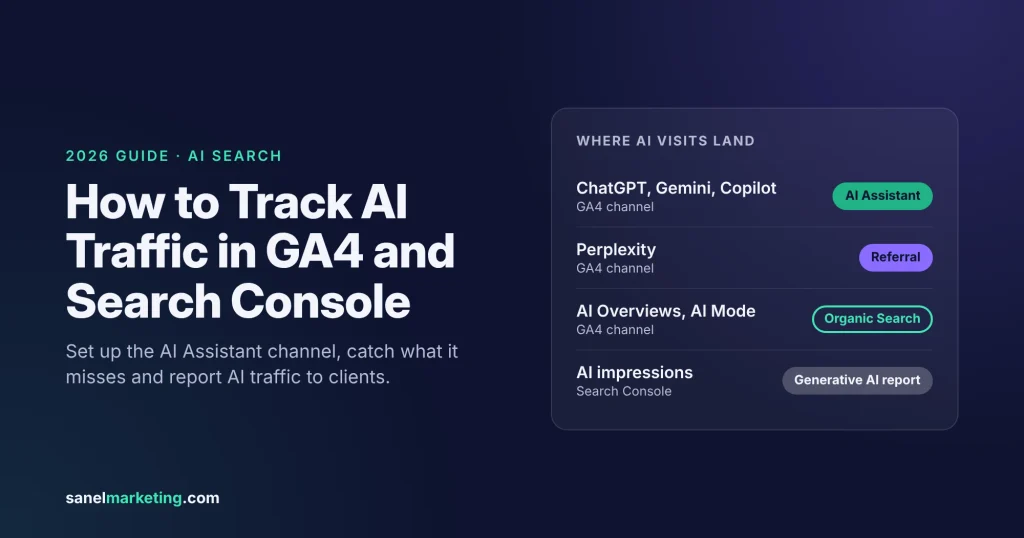
When a visit comes from a recognized AI referrer, GA4 sets the medium to “ai-assistant” and the campaign to “(ai-assistant)”. Google’s definition names ChatGPT, Gemini, DeepSeek, Copilot and Grok, and says the channel excludes AI Overviews and AI Mode (Google Analytics Help). Those count as Organic Search.
The rollout was gradual and reached most properties by early June 2026. The native channel only counts from the date your property got it. It doesn’t reclassify older sessions (Search Engine Journal).
AI source | Where it usually shows up in GA4 |
ChatGPT, Gemini, Copilot, Grok, DeepSeek | AI Assistant |
ChatGPT before your rollout date | Referral |
Perplexity | Usually Referral |
Claude | AI Assistant or Referral, so check your source / medium report |
Google AI Overviews and AI Mode | Organic Search |
AI apps and in-app browsers with no referrer | Direct |
How do I track AI referral traffic in GA4?
Open the Traffic acquisition report and look for the AI Assistant row. It takes under a minute.
- Go to Reports > Acquisition > Traffic acquisition.
- Make sure the table’s first column is Session primary channel group (or Session default channel group). Look for the AI Assistant row.
- To see which AI tools sent visits, change the dimension to Session source / medium and search for “ai-assistant”.
- Add Landing page as a secondary dimension to see which pages AI tools send people to.
- Check Key events and Engagement rate for the row. AI visitors often arrive with a specific question, so compare them with Organic Search.
If you have segments or filters built on the medium dimension, review them. Recognized AI visits now carry the medium “ai-assistant” instead of “referral”, so older rules may sort them differently.
How do I track AI traffic GA4 misses?
Build a custom channel group with an AI channel. It catches Perplexity and other tools Google’s list leaves out, and it applies to your older data too.
- Go to Admin > Data display > Channel groups and click Create new channel group. Copy the default group so you keep the other channels.
- Click Add new channel and name it AI.
- Set the condition to Session source matches regex, and paste this:
.*(chatgpt|openai|perplexity|gemini\.google|copilot\.microsoft|claude\.ai|deepseek|grok\.com|meta\.ai|mistral\.ai).*
- Add a second condition with OR: Session medium exactly matches ai-assistant.
- Drag the AI channel above Referral. GA4 checks channels from top to bottom, so it has to come first.
- Save, then pick your new group in the Traffic acquisition report.
Don’t add a bare word like “google” or “gpt”. It would catch normal Google searches and other false matches. Review the list every quarter, since new AI tools keep appearing.
If you can’t edit channel groups, use a quick filter instead: in Traffic acquisition, add a filter for Session source matching the same regex.
How do I track AI Overviews and AI Mode traffic?
Use Search Console’s Generative AI performance report. It shows how often Google’s AI features showed links to your site, but not how many people clicked.
Google launched the report on June 3, 2026, and rolled it out to all websites worldwide by August 31, 2026 (Google Search Central). You’ll find it under Performance > Search results > Generative AI.
What it shows (Search Console Help):
- Impressions in AI Overviews and AI Mode, counted when a link to your site was shown.
- Pages, countries, devices and dates. You can see which URLs get the most AI impressions.
- Search type, split into text searches and multimodal searches like Google Lens.
What it doesn’t show: clicks, click-through rate or queries. The clicks still happen, but they’re mixed into your regular Performance report and into GA4’s Organic Search channel.
So to estimate AI Overviews traffic, check which pages gain AI impressions, then watch those pages’ organic clicks and key events in GA4. It’s a proxy, not a precise number.
One data note: Google confirmed a logging error lowered Generative AI report impressions from November 9 to 11, 2026. Leave those days out of comparisons. More on that in the November 2026 core update checklist.
Why is my AI traffic lower than I expected?
Because a lot of AI traffic doesn’t carry a clear source. Every method above gives you a minimum, not a total.
- No referrer. Visits from AI apps and in-app browsers often arrive with no referrer, so GA4 files them as Direct. Estimates of how much AI traffic this affects vary widely between studies, so treat any single figure with caution.
- Missing UTM tags. ChatGPT usually adds utm_source=chatgpt.com to cited links. In October 2026, a bug dropped the tag for about a week before OpenAI fixed it.
- Split rows. The same source, like chatgpt.com, can appear as ai-assistant, referral and (not set). The (not set) rows land in Unassigned.
- AI influence without a click. People often see a brand in an AI answer, then search for it or type the URL later. Brands recommended by ChatGPT were 2.5 times more likely to get a website visit within seven days, per Similarweb research (Neil Patel).
“I never report AI traffic as one number. I show the AI Assistant channel, our custom AI channel and the leads who told us they found us through AI, side by side. That gives clients an honest minimum and a clear direction.“
Sanel “Nel” Espina, SEO Specialist
What else should I track to measure AI visibility?
Track the signals AI influence leaves behind: branded searches, self-reported sources and your mentions in AI answers.
- Branded searches. Use Search Console’s branded queries filter under Performance > Search results > Add filter > Query. More people searching your brand name is often the first sign AI tools are mentioning you.
- “How did you hear about us?” Add it to every contact form and include “ChatGPT or another AI tool” as an option.
- Direct traffic to deep pages. A rise in Direct visits from new users landing on blog posts or service pages, not your homepage, often points to AI referrals with no source.
- Your mentions in AI answers. Ask ChatGPT, Gemini, Perplexity and AI Mode your buyers’ questions every month and log who gets named. For ChatGPT, you can also use ChatGPT Business Hub to see mentions and website clicks.
“AI visits hide in your direct and organic traffic. That’s why I ask every new lead how they found us, and ‘ChatGPT or another AI tool’ is always one of the options.“
Sanel “Nel” Espina, SEO Specialist
How should agencies report AI traffic to clients?
Report a small set of numbers every month, label each one as a minimum, and show the trend instead of a single total.
Metric | Where to find it | What it tells the client |
AI Assistant sessions and key events | GA4 Traffic acquisition | Clicks from chatbots Google recognizes |
Custom AI channel sessions | GA4, custom channel group | All known AI referrals, including Perplexity |
Top AI landing pages | GA4, AI channel + Landing page | Which content AI tools send people to |
AI Overviews and AI Mode impressions | Search Console Generative AI report | How often Google’s AI features show the site |
Branded clicks | Search Console branded queries filter | Whether brand demand is growing |
Leads who said “AI tool” | CRM or form entries | AI influence that analytics can’t see |
Compare each month with the one before and with the same month last year. AI traffic is still small for most sites, so the trend matters more than the raw number.
If the numbers are flat, the fix is usually visibility, not tracking. Here’s how to get cited in Google AI Overviews and other AI answers.
Frequently asked questions
Does GA4 track ChatGPT traffic automatically?
Yes, since May 13, 2026. When a visit comes from ChatGPT with a referrer, GA4 puts it in the AI Assistant channel with the medium ai-assistant. Visits without a referrer still show up as Direct.
Why does my Perplexity traffic show as Referral?
Perplexity isn’t on Google’s named list of AI assistants, so in most properties GA4 still treats it as a normal referral. Add it to a custom AI channel group to count it with your other AI traffic.
Can I see AI Overviews clicks in GA4?
No. GA4 counts clicks from AI Overviews and AI Mode as Organic Search, and there’s no way to split them out. Use Search Console’s Generative AI report to see impressions instead.
Does Search Console show AI Mode clicks?
No. The Generative AI performance report shows impressions for AI Overviews and AI Mode by page, country, device and date. It doesn’t show clicks or queries.
Does a custom AI channel group work on old data?
Yes. Custom channel groups apply to your historical data, so you can compare AI traffic from before May 2026. The native AI Assistant channel only counts from its rollout date.
What regex should I use to track AI traffic in GA4?
Use a Session source regex that covers the main AI tools, such as .*(chatgpt|openai|perplexity|gemini\.google|copilot\.microsoft|claude\.ai|deepseek|grok\.com|meta\.ai|mistral\.ai).* Review it every quarter as new AI tools appear.